Boarding school application essays are deceptively challenging. Prompts ask students to pack personality, reflection, honesty, and specificity into very small spaces. Most applications require a blend of short-form statements (ranging between 150 characters / 1–3 sentences to c.900 characters / 4–6 sentences) and longer essays (ranging between 500–725 words / 1–3 pages single-spaced). Relative to other components of the application, we found the essay portion required the logistics and organization of planning for campus tours, combined with the patience and deep thought needed for interviews.
This is a look at the practical scaffolding my husband and I implemented to help our daughter through this long-tailed endeavor, all while ensuring the words and ideas remained entirely her own. This article is organized into four sections: what to expect; tactical guidance around getting organized; our approach to brainstorming and feedback; and an overview of the template we used.
To be clear: throughout this article, I will not post specific prompts for each school, but will provide quantitative and qualitative descriptions, so you get a feel for what to expect and how best to help your child organize.
Note: This article does not touch upon parent statements. my 'Parent Statements' article for my observations and thoughts about that topic.
What To Expect
Quantification of Student Statement Prompts
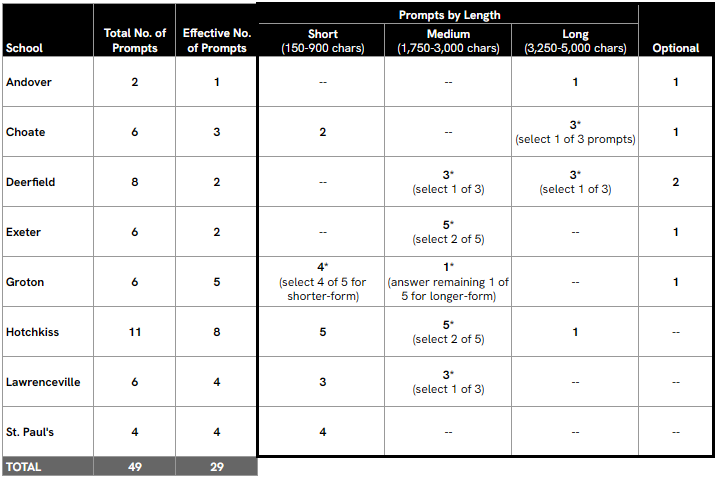
Requirements vary wildly. On one end, Andover required only a single, open-ended, 4,500-character essay; and on another end, Hotchkiss required eight responses—including one long-form essay.
Maximum lengths: The longest requirements are from Andover and Hotchkiss, whose long-form essays have 4,500 and 5,000 character limits, respectively (converted, this equals roughly 900 words / 2–3 pages single-spaced).
Minimum Lengths: 5 / 8 of Hotchkiss’s required responses are ultra-short (150 character limits / 1–3 sentences). St. Paul’s only four prompts limit students to 300 characters per prompt. Otherwise, most other schools’ short-form statements hover between 650–900 characters.
Optionality: Many schools allow students to select the prompt they wish to address as their longer-form essay.
Notes
(1) ‘Total No. of Prompts’ = number of prompts, including all prompt options (e.g., select X of Y to answer) and optional prompts
(2) Asterisk (*) denotes where prompt selection options are offered
(3) Effective No. of Prompts = number of prompts — excluding prompt options and optional prompts, that must be answered by student applicants
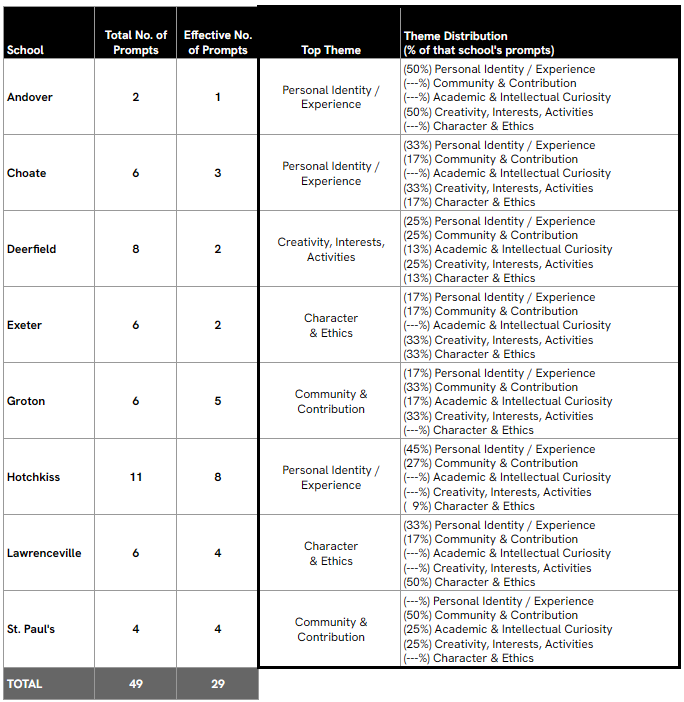
(4) Theme categories created and assigned by me
Qualitative Assessment of Student Statement Prompts
To give you a sense for the nature of these prompts, I’ve abstracted prominent thematic categories, without attributing prompts to any specific school.
- Personal Identity and Experience: Many schools sought deep personal reflections on the applicant’s background and growth; for example, asking applicants to describe their upbringing and how it impacted them, reflect on an experience that shaped their lives, or describe a core facet of their personal story.
- Community and Contribution: Several schools focus one or multiple prompts around how the applicant will engage with the school’s environment. Prompts frequently asked about contributing to campus life, belonging to a community, or exploring specific features of the school.
- Academic and Intellectual Curiosity: These were prompts about favorite subjects, books, global issues, and classroom interests.
- Creativity, Interests, and Activities: These prompts invited applicants to reveal what they genuinely care about outside of academics, and how they engage with the world creatively, physically, or intellectually outside of a classroom.
- Character and Ethics: A couple of schools asked applicants to describe moments when their values were tested, or when they faced adversity or disappointment. Stating the obvious, the response should also conclude with the “thing learned.”
In addition to standard (e.g., 300–5,000 character essays), a couple of schools included ultra-short prompts (e.g., 150 characters). These were fun. A couple schools use ultra-short prompts to gather low-friction detail about an applicant. By “low-friction,” I mean specific / factual / anecdotal pieces of personal information that require little emotional labor or deep analysis for an applicant to produce (but which still require thoughtfulness). A couple examples of these are: “my most prized possession is…” and “a strength of mine that can help others is…”
Student statements allow Admissions Officers to humanize the applicant beyond a collection of grades and test scores. They allow for Admissions to determine overall, as well as specific fit with a school’s culture or specific extracurricular offerings. And the brevity required by many prompts gives immediate glimpses into a student’s personality—interests, sense of humor, unique perspectives, that might otherwise be obscured in longer-form essays.
Tactical Guidance Around Getting Organized
The main goal of this endeavor was, of course, to complete and submit student statements by the deadline. Our other goals were to help my daughter showcase a well-rounded and authentic version of herself, and to do this efficiently.
To manage visibility and efficiency across c.30 responses for multiple schools, I created a single, templated document in GoogleDocs. This centralized template was organized by school (with intra-doc hyperlinks) and by prompt, and allowed all three of us (my daughter, my husband, and myself) to work asynchronously. It was also structured to retain every iteration of a response and its associated feedback for reference, which prevented us from losing good ideas in the revision process.
I should make clear that this approach is *not* for everyone. I went down a template/shared document format mainly to be able to view all prompts and draft responses as a whole, and to avoid having to log onto the ‘Gateway’ portal and click through sections of each school’s application just to view/edit a prompt.
Our Approach to Brainstorming and Feedback
Once we got organized, we approached this process with six firm guiding principles:
1. Her ideas, her words: Every response had to originate from her and be written by her
2. Candid feedback: With limited time, we agreed there would be no pride in authorship; our feedback would be direct and constructive
3. Transparency: Our daughter saw our parent statements (also included in the template), and we had the ability to view and comment on her work-in-progress versions
4. Holistic responses: The transparency allowed us to be thoughtful and strategic about the points we were *collectively* raising about her, ensuring the student and parent statements corroborated, emphasized, and/or added to complementary facets of her personality
5. Iterative process: We accepted that multiple iterations would be necessary—even for the ultra-short statements (and also that this would be a long-tailed exercise)
6. No effort wasted: We used the essay process as a valuable opportunity to incrementally improve her general writing process and skills
Our effort coalesced into four distinct phases: orientation and initial brainstorming; developing a lens; iterating; and finalizing.
Phase 1: Orientation and Initial Brainstorming
This phase was focused on familiarization (of each and all the prompts/themes) and establishing foundational ideas. Out of the c.45 distinct prompts presented across all schools, our daughter ultimately needed to draft responses for roughly 30. While this number seemed daunting, organizing them into a single template revealed thematic similarities (as described in the section above).
Our strategy was to brainstorm versatile, foundational components. For example:
- “Time when…” prompts: She identified several specific examples for each general theme (e.g., failure, conflict, leadership)
- Identity prompts: She brainstormed key characteristics, then whittled the list down to traits that best represented who she is, how she has grown, and her aspirations
This approach ensured she had a library of mix-and-match ideas she felt comfortable expounding upon to address most prompts efficiently.
Phase 2: Developing a Lens — From Telling to Showing
This was the most challenging phase, as my goal was to equip her with the critical lens and tools needed to work through prompts independently. The difficulty stemmed from three issues:
1. Structure: She had many ideas, but struggled to formulate the crucial “so what” connection
2. Constraint: She had no prior experience writing under severe character/word limits
3. Style: All her previous school writing had been expository or creative, granting her the luxury of using many words to explicitly tell the reader her point. Now—especially because of draconian character counts—she needed to show (illustrate) her points using precise language and tight, corollary ideas
Since our first guiding principle was that the responses had to be her ideas and her words, I spent time coaching her on how to “read between the lines” and understand the non-literal intent of a prompt.
Example #1: a couple of schools asked about traits that would make for an ideal roommate/classmate. One school asked to reference a real or fictional character. My daughter selected Mirabel, from the movie, Encanto.
Initial draft: She used 85% of the limited space to factually contextualize the movie and profile Mirabel, only briefly mentioning why Mirabel would be a good classmate and friend (because Mirabel would be good in a Harkness setting, and is upbeat/awkward like my daughter)
Feedback: My comments focused on “so what” and “why/how” (i.e., so what… specifically about Mirabel’s personality did you identify with, and how does that translate into being a good classmate/roommate?)
Revised response: She reduced the context to 40% of the response—but reframed the overview about Mirabel to focus on her non-obvious, non-magical “gifts.” In this 40% portion of the response, she explained how Mirabel used her “gifts” to help her family work through their own internal struggles. And then she connected these themes with traits of being a good classmate (being reflective and community-minded). She kept references from her original response about being upbeat, awkward, and working through self-doubt as unifying characteristics that would create a strong bond between herself and Mirabel.
The take-away we reinforced was this: when constrained by a character count, you must be more precise with your ideas and words than you’ve ever had to be.
We also emphasized that writing is difficult, that everyone finds writing difficult, and that this practice she is getting—from working through these essays—is a valuable opportunity in itself.
Phase 3: Iterating
We began the essay process in early October, about two weeks before her first interview, using the prompts as paradigmatic examples of exactly the type of self-reflection questions my daughter needed to consider to prepare for interviews.
First sessions: The initial sessions were long (up to three hours with breaks). She would draft, we would discuss candid feedback (which I also typed out in our template for reference), and she would refine. For certain prompts, we found it helpful to talk through the ideas first, with my role being to ask open-ended questions that forced her to re-evaluate/reframe/refine her thoughts and structure them into a bulleted outline.
- These first sessions were long and somewhat painful; but we both thought the time investment was worth it to give her a framework and confidence she needed to work independently.
Go-forward rhythm: Once she internalized the reading lens and writing approach, we shifted to an asynchronous operating rhythm. She worked on essays when she had time (rarely, she’d have time on a weekday to work through a prompt; mostly, she devoted an hour or two across various weekends). She let me know when a draft response was ready to review, and I’d review it on my own time and document my feedback. Where she needed help getting started (or on the rare occasion I felt her response did not address the spirit of the prompt), we spent some time talking her ideas through in real time.
- For what it’s worth, this was not a continuous effort. She took an extended break from essays to focus on interview prep and the SSAT, realizing she could use the December break—if needed—to work through the rest of her essays.
Phase 4: Finalizing
Our ultimate goal was to have all submission-ready drafts finalized at least two weeks before the final deadlines. This crucial buffer time allowed her to step away completely and then revisit the essays with fresh eyes for a final pass.
- While she didn’t end up making major structural revisions in this phase, the final review was valuable: she caught typos, tightened run-on sentences, and substituted words for more precise ones. Her goals during this “final” phase were: clarity and polish.
Template Overview
In this section, I share a few visuals to help explain why we used the template and how we structured/used it.
Why We Used a Template
Through the ‘Gateway’ application portal, students and parents can start/save/revisit draft responses at any time, prior to submission. However, I found the workflow to do this time-consuming and burdensome.
For example, to see and respond to a prompt, users must: (i) log onto Gateway; (ii) Scroll through the ‘Checklist’ landing dashboard to a school; (iii) Click the ‘part’ of the school’s application where student statements/essays are (each school organizes the component ‘parts’ of their application slightly differently; though for most schools, the student statements/essay ‘part’ is usually in “Part 2,” sometimes as a standalone part, or sometimes coupled with other required parts, such as the parent statement); (iv) Find the school and student statement/essay part you wish to address, and select “Continue Form;” and (v) Continue to click “Next” through several screens until you arrive at the short-answer statement prompts or essay prompt you’re looking for.
See the two images below for visuals corresponding to steps no. (iv) and (v):
Step no. (iv): to access part where you can edit prompts, you’d need to click “Continue Form” under the “My Short Answer and Essay 1” for School #1, and “My Candidate Statement 1” for School #2.
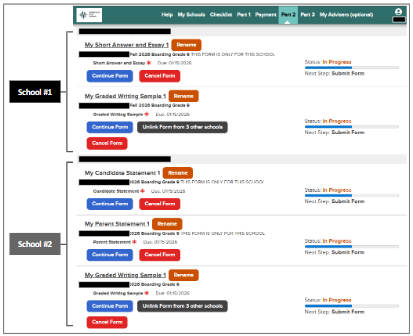
Step no. (v): to access the prompts themselves, you’d need to click “Next” through one or several pages.
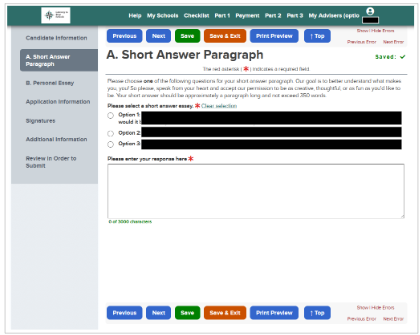
In addition to our goal to be able to see all the prompts in aggregate, and all our student and parent draft responses in a singular document, the other practical reason for creating a template was simply that I’ve always been fearful of prematurely submitting something in this type of format. I don’t know what the process is to recall an inadvertently submitted response; and I do not trust myself enough to never need to find that out.
How We Structured and Used the Template
As noted above, we used a shared Google Doc to organize ourselves within a single document. We did this for several reasons, including, but not limited to:
- Time-saving: obviate the time it took to click through the Gateway Portal in order to see responses
- Strategic / big picture: be able to read questions across schools, which allowed for us to effectively brainstorm themes and storylines for each response (especially since many repeated across the schools)
- Efficiency / efficacy: be able to read / scan top to bottom, which allowed us to get a sense for each school’s response as a whole (this helped tremendously with revisions; for example: we were able to flag repetitive content that had been covered in a prior response, or get a sense for if all the responses—in aggregate, hung together)
- Neuroticism: I have always been afraid of prematurely submitting an unfinished response
The images below show examples of our template, along with how we used it.
Image #1: Title Page
- The template was composed of two parts: (1) a ‘working’ and (2) ‘final form’ doc. The ‘working’ doc is where we spent virtually all our time iterating. Only when we reached Essay Lifecycle Stage 4 (complete), were responses migrated into the ‘final form’ section for *final final* revisions (namely typos and surgical edits to improve readability).
- The document had intra-doc links embedded everywhere; this was to make it easier / faster to jump to a school or back to the top (vs. having to scroll and find).
- The table served as an at-a-glance status of what was: not started vs. in progress vs. complete. This was helpful for many obvious reasons—including being able to take stock of the volume of work still ahead of us.
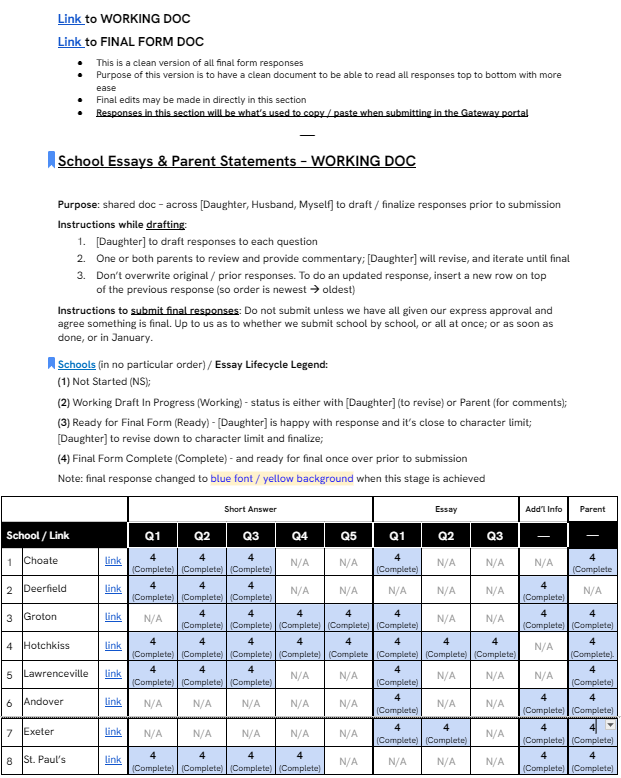
Image #2: General Structure
- Each school followed the same structure, and contained sections for: (i) short / medium-form answers; (ii) long-form answers; (iii) parent statements.
- Section headers were always in black. Questions were in light gray. Section ends were in blue.
- Each prompt was abstracted (from Gateway) and input in this template — along with a reminder about the character limit (and translation into an approximate number of words / sentences).
- I started each question with a single line, with the intent (as per instructions on the title page), that each revision / review with comments would be added as a separate line above in order to preserve context and original ideas.
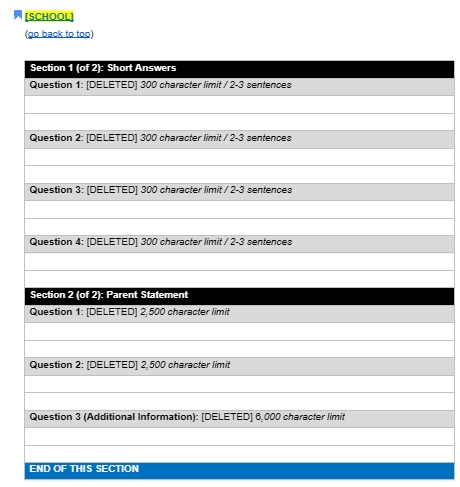
Image #3: ‘Select X of Y’ to Answer
- Where some schools had applicants select X of Y prompts to answer, I abstracted all prompts and instructions, and created extra lines for my daughter to re-state the prompt(s) she decided upon.
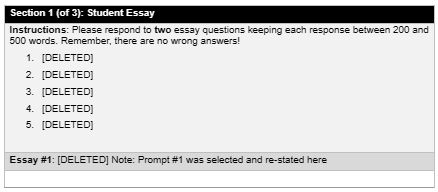
Image #4: Timestamping / Versioning
- The image below is to show you examples of how we timestamped / versioned each iteration of revisions and comments.
- We did not stick consistently to a particular syntax. I just wanted to make sure we were able to tell: (i) who wrote what; and (ii) what version something was. Additionally, for tracking / informational purposes / easy reading, where relevant, we noted: (iii) dates; and (iv) character counts.
- In this image, you will also notice: (1) the separate lines used for each iteration (to preserve full history and context); and (2) the blue font / yellow background used when a response was ‘complete.’
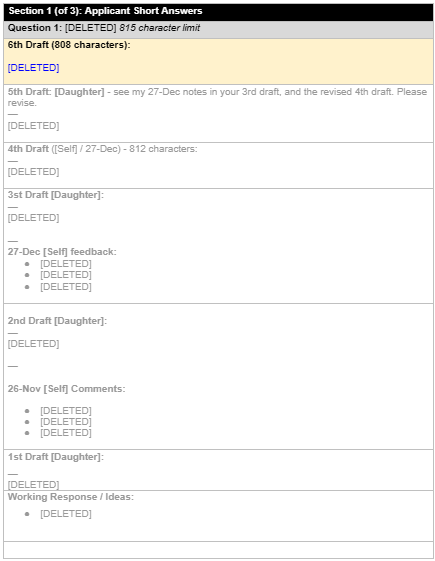
Image #5: Full Iteration Example
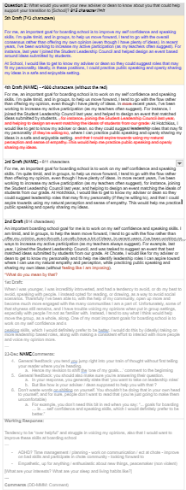
- The image below shows you a visual of what a fully iterated response looked like.
- We did this for all the prompts. Some were easier / shorter; some were harder / longer.